Incorporate external models

In order to allow you to incorporate external models or custom PII detections in the automated flows the setup allows to incorporate these easily. This has the following use cases

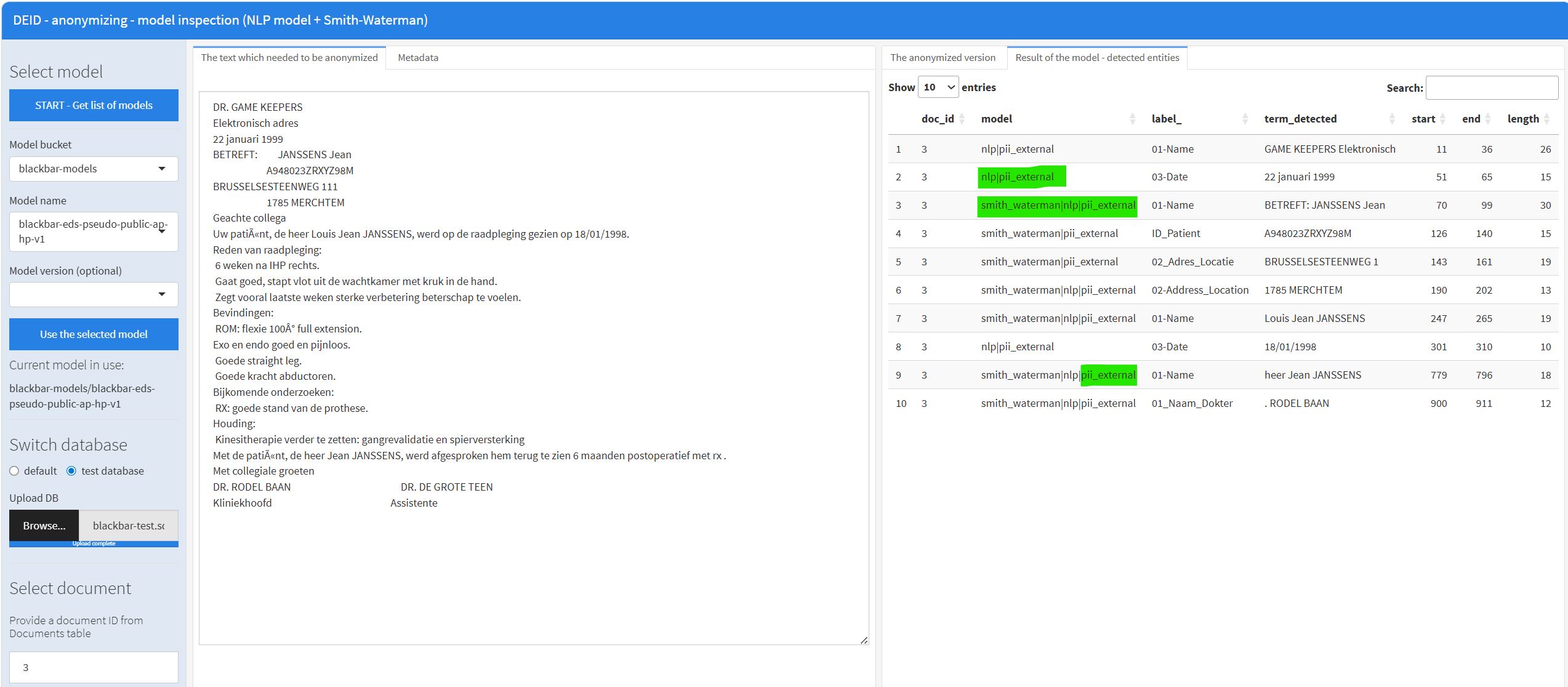
In the following example, we show a typical setting where you have a document id and the text. The PII detection is done using an LLM and we show in which structure and table the data should be stored. From that point onwards (once you have put the data in the database table blackbar_pii_external as shown here all the existing blackbar flows which do the PII detection will combine the result of the deep learning models, the Smith Waterman algorithm and your own detections which you have put into the blackbar_pii_external table. As a result you can also inspect in the app what is detected with the different components.

Example

Example data

In the below data we have some French clinical notes contained in a dataset with columns doc_id and text

from blackbar import blackbar_example
data = blackbar_example("documents_fhir")
data = data[data["language"] == "fr"]
data = data[["doc_id", "text"]]
data
      doc_id                                               text
2726       1  Note clinique :\n\n- Patient : M. Rudolf Nolan...
2727       2  Ce dossier médical concerne M. Hobert Armand B...
2728       3  Note clinique pour Mme Sonia María Bañuelos :\...
2729       4  1. Informations sur le patient :\n   - Nom : M...
2730       5  Informations sur le patient :\n- Nom : Mme Sha...
...      ...                                                ...
5447    2722  M. Irving Sidney Schultz, un homme de langue a...
5448    2723  Pt : Silas Mose O'Hara, homme. Date de naissan...
5449    2724  - Mme Charis Cary Dickinson\n  - Contact : 555...
5450    2725  Informations sur le patient : M. Efren Linwood...
5451    2726  - Patient : Beatris Patience Schimmel\n- Date ...

[2726 rows x 2 columns]

Your external LLM

We are going to use an LLM to extract the PII information of these notes. In the below example we use python package localllm. That python package basically allows to use dspy for structured data extraction on local LLM models which you can just download or are available at your environment through an API.

  • This shows how to connect to a locally downloaded LLM e.g. a quantised version of Qwen3.5-9B. So without using any API.
from localllm import localllm_download_model, localllm_connect
model_name = "localllm/Qwen3.5-9B-Q4_K_M"
path = localllm_download_model(model_name)
path
'/home/runner/.localllm/models/Qwen3.5-9B-Q4_K_M.gguf'

Use the model

  • We load the model with a context of 4096 tokens - possibly on the GPU if it’s available.
config = dict(
    n_ctx = 4096, n_gpu_layers = -1,
    n_threads = 1, flash_attn = True, chat_format = None, swa_full = False, verbose = False)
llm = localllm_connect(path, model_kwargs = config)

Once we have the model, you can use your own logic or you can use the zero-shot built in prompts put in the blackbar package which has prompts for all the PII types which blackbar uses and which are defined here. The predict function applies the LLM on the predefined prompts and returns the extracted entities found in the text in a structured format.

from s3generics import predict
from blackbar.llm.ner import BlackbarPIIZeroShotBuiltIn
model  = BlackbarPIIZeroShotBuiltIn(model = llm)
result = predict(model, newdata = data.tail(2), language = "fr")
result
  doc_id          entity_type  \
0   2725              01-Name   
1   2725              01-Name   
2   2725  02-Address_Location   
3   2725              03-Date   
4   2726              01-Name   
5   2726  02-Address_Location   
6   2726     04-Age_birthdate   

                                         entity_text  entity_from  entity_to  \
0                              M. Efren Linwood Mohr           30         51   
1                                   Dr. Barrett Wolf          333        349   
2                         HOLYOKE MEDICAL CENTER INC          142        168   
3                                    16 février 2022          205        220   
4                          Beatris Patience Schimmel           12         37   
5  981 Johnston Mews, New Bedford, Massachusetts,...           83        140   
6                                         2008-11-08           60         70   

                             model entity_lookup  entity_lookup_similarity  \
0  blackbar-llm-zero-shot::default         exact                       1.0   
1  blackbar-llm-zero-shot::default         exact                       1.0   
2  blackbar-llm-zero-shot::default         exact                       1.0   
3  blackbar-llm-zero-shot::default         exact                       1.0   
4  blackbar-llm-zero-shot::default         exact                       1.0   
5  blackbar-llm-zero-shot::default         exact                       1.0   
6  blackbar-llm-zero-shot::default         exact                       1.0   

  external_comment  
0             None  
1             None  
2             None  
3             None  
4             None  
5             None  
6             None  

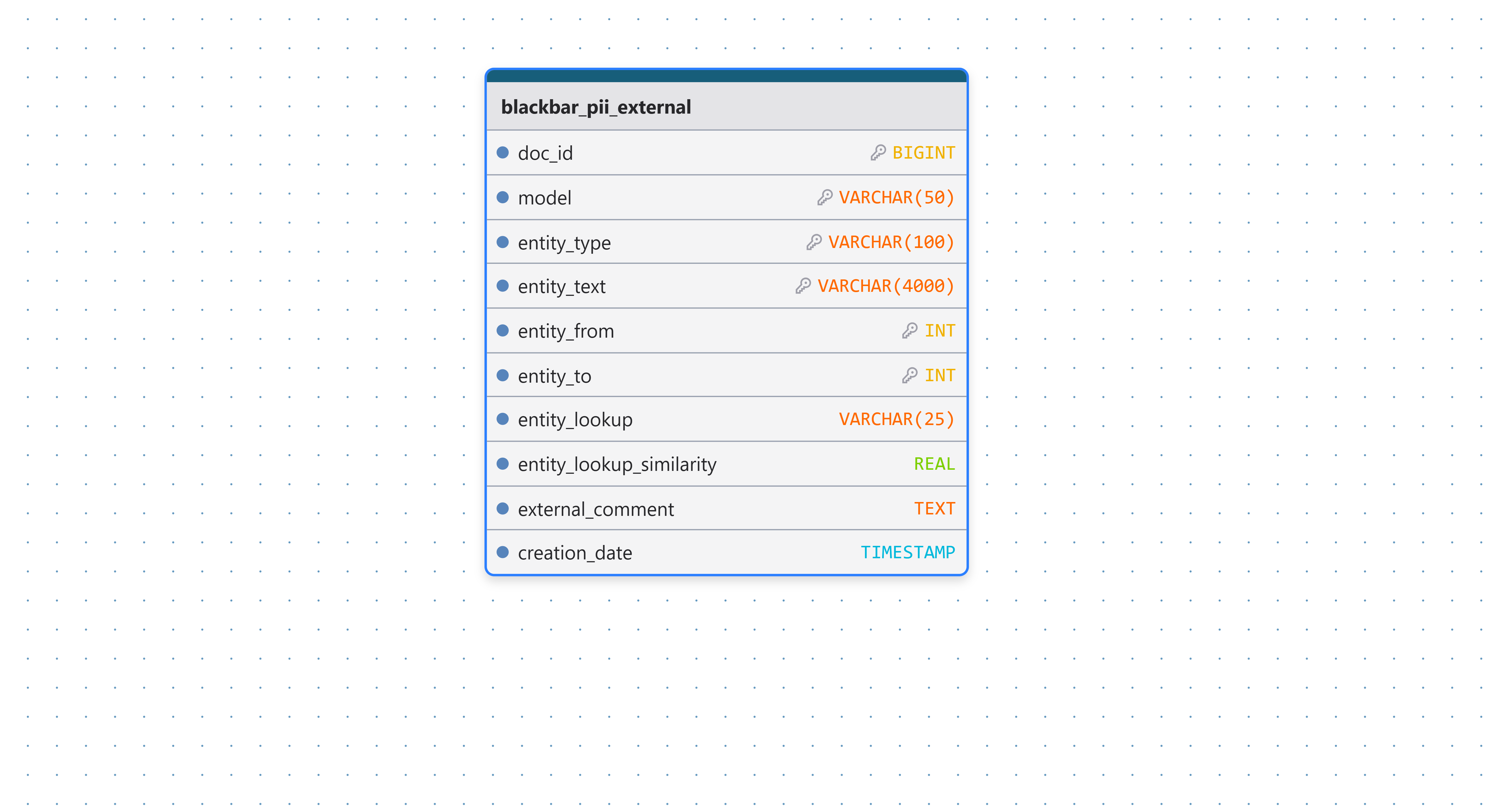
That data should contain the doc_id, the entity_type, the detected text, the exact position in the text (entity_from/entity_to), the name of the model, a field called entity_lookup indicating ‘exact’, a similarity metric and you can put some comments? This data structure needs to be put in the ´blackbar_pii_external´ table in the database - e.g. as follows or using your own script.

import os
from blackbar import BlackbarDB
db = BlackbarDB(type = "postgresql", tables = os.getenv("BLACKBAR_DB_TABLES", default = "default"))
db.write(result, type = "pii_external")

blackbar_pii_external

These detections will then shown in the apps and also will be used in the flows where the different detections will be combined.

Details

External API

Note that python package localllm also allows to connect to an API.

  • This shows how to use localllm to connect to your local API which has an openai-compatible API (e.g. vllm/ollama/lmstudio/llamacpp)
  • The rest of the code shown above can be the same
from localllm import localllm_download_model, localllm_connect
config = dict(
  api_base = "http://localhost:1234/v1", api_key = "none", 
  model_type = "chat", provider = "openai", cache = True, response_format = dict(type = "text"))
llm = localllm_connect(lm = "openai/gemma-4-E2B-it-GGUF", model_kwargs = config)

Indexing of fields entity_from/entity_to

Note that the fields entity_from/entity_to should have indexes as follows.

from localllm import txt_locate_all
text = "Hello Dr. Jan Willems. You remember my name Jan or not?"
loc = txt_locate_all(text, "Jan")
loc
[TextSpan(text='Jan', start=10, end=13), TextSpan(text='Jan', start=44, end=47)]
text[10:13]
'Jan'

Zero-shot prompts

The zero-shot prompts as used in BlackbarPIIZeroShotBuiltIn are implemented as dspy input/output definitions which look as follows.

from blackbar.llm.ner import dspy_signature_pii
PII_Identify = dspy_signature_pii(locale = "fr")
PII_Identify
PII_Identify(text -> persons, address, identifiers_patient, identifiers_physician, identifiers_register, dates, birth_date, professions, organizations, contactdetails, other
    instructions="Détectez les personnes, noms, adresses, numéros de téléphone, âges, numéros d'identification et autres informations personnelles dans le texte"
    text = Field(annotation=str required=True json_schema_extra={'__dspy_field_type': 'input', 'prefix': 'Text:', 'desc': '${text}'})
    persons = Field(annotation=list[str] required=True json_schema_extra={'desc': 'Tous les noms de personnes mentionnés dans le texte', '__dspy_field_type': 'output', 'prefix': 'Persons:'})
    address = Field(annotation=list[str] required=True json_schema_extra={'desc': 'Toutes les adresses ou lieux mentionnés dans le texte, éventuellement avec des espaces ou des sauts de ligne entre eux.', '__dspy_field_type': 'output', 'prefix': 'Address:'})
    identifiers_patient = Field(annotation=list[str] required=True json_schema_extra={'desc': "Numéros d'identification mentionnés dans le texte qui se réfèrent au patient, tels que connus dans l'établissement médical. Ce ne sont pas des noms mais des numéros ou des identifiants.", '__dspy_field_type': 'output', 'prefix': 'Identifiers Patient:'})
    identifiers_physician = Field(annotation=list[str] required=True json_schema_extra={'desc': "Numéros d'identification mentionnés dans le texte qui se réfèrent au médecin ou aux médecins. Ce ne sont pas des noms mais des numéros ou des identifiants.", '__dspy_field_type': 'output', 'prefix': 'Identifiers Physician:'})
    identifiers_register = Field(annotation=list[str] required=True json_schema_extra={'desc': "Numéro d'identification d'une personne tel qu'un numéro de registre national ou numéro de sécurité sociale mentionné dans le texte", '__dspy_field_type': 'output', 'prefix': 'Identifiers Register:'})
    dates = Field(annotation=list[str] required=True json_schema_extra={'desc': 'Dates mentionnées dans le texte', '__dspy_field_type': 'output', 'prefix': 'Dates:'})
    birth_date = Field(annotation=list[str] required=True json_schema_extra={'desc': 'Dates de naissance ou âges mentionnés dans le texte', '__dspy_field_type': 'output', 'prefix': 'Birth Date:'})
    professions = Field(annotation=list[str] required=True json_schema_extra={'desc': 'Professions mentionnées dans le texte liées au patient', '__dspy_field_type': 'output', 'prefix': 'Professions:'})
    organizations = Field(annotation=list[str] required=True json_schema_extra={'desc': 'Organisations mentionnées dans le texte. Comme les établissements médicaux, hôpitaux, centres de soins résidentiels, pharmacies, etc.', '__dspy_field_type': 'output', 'prefix': 'Organizations:'})
    contactdetails = Field(annotation=list[str] required=True json_schema_extra={'desc': 'Coordonnées mentionnées dans le texte telles que adresses e-mail, numéros de téléphone, URLs, données de fax, sites web', '__dspy_field_type': 'output', 'prefix': 'Contactdetails:'})
    other = Field(annotation=list[str] required=True json_schema_extra={'desc': "Autres informations personnelles non médicales mentionnées dans le texte telles que numéros de compte bancaire, numéros d'assurance, numéros d'étude et similaires.", '__dspy_field_type': 'output', 'prefix': 'Other:'})
)
How to apply the zero-shot to data in the database

The example code below applies the zero-shot model with gemma-4-E2B-it-Q4_K_M on data in the database

from blackbar import BlackbarDB
from blackbar.llm.ner import BlackbarPIIZeroShotBuiltIn
from localllm import localllm_connect, localllm_download_model
from localllm.utilities import tif
from s3generics import predict
from rlike import Sys_getenv
##
## Get the local LLM model
##
model_name = "localllm/gemma-4-E2B-it-Q4_K_M"
path = localllm_download_model(model_name)
llm = localllm_connect(
  model_name, 
  model_kwargs = dict(
    n_ctx = 4096, n_gpu_layers = -1, n_threads = 1, 
    flash_attn = True, verbose = False, main_gpu = 1)) 
model = BlackbarPIIZeroShotBuiltIn(model = llm)
##
## Get some Documents to predict using the basic ZeroShot model 
## Make sure it's in the text-interchange format with columns doc_id and text
## Detect the entities with the model with a minimum length of 3 characters and store results in database
##
db = BlackbarDB(
  type   = Sys_getenv("BLACKBAR_DB", unset = "postgresql"), 
  tables = Sys_getenv("BLACKBAR_DB_TABLES", unset = "default"))     
x = db.read_documents(ids = list(range(100)))  
x = tif(x, docid_field = "ID", text_field = "text")
x = predict(model, newdata = x, language = "nl", min_size = 3)
out = db.write(x, type = "pii_external")